
Qlik Environment, Wrapped
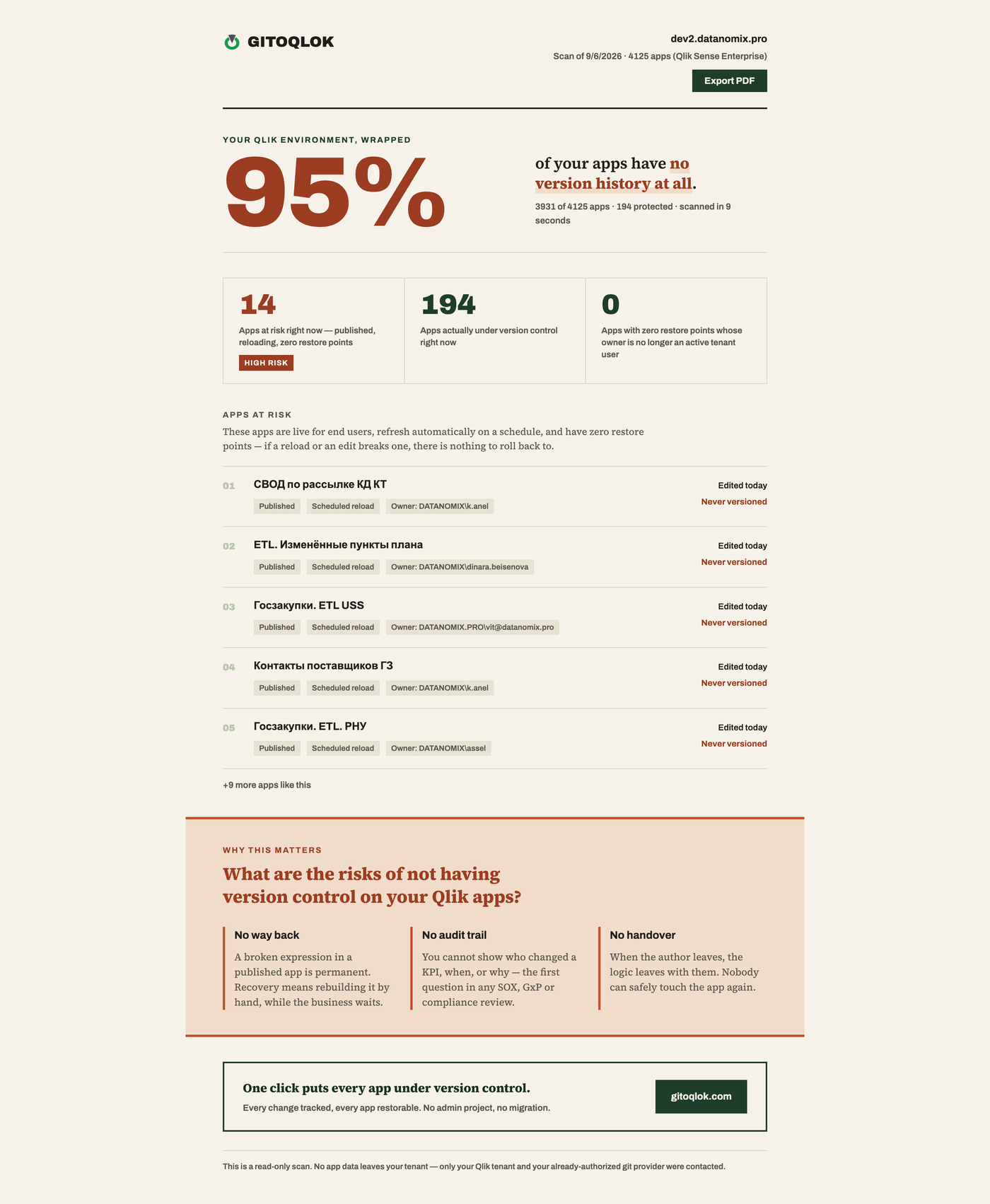
Qlik Environment, Wrapped scans every app you can see on the hub and produces a one-page report: the share of apps without any version history, the apps that are published, reloaded on a schedule and edited recently but have no restore point, and unprotected apps whose owner is no longer active.
Click How's My Qlik? on the hub
The light-blue button sits in the bottom-right corner of the Qlik Cloud and Qlik Sense Enterprise hub.
Wait for the scan
Gitoqlok collects app, reload and version-control metadata. The scan runs in your browser and usually takes under a minute; you can keep working.
Read the report
The report opens in a new tab. Export PDF saves it for a conversation with management.
Where the data comes from
- Your Qlik server or tenant: the app list, publish status, reload schedule and, if you are a tenant admin, the user directory.
- Your Git provider: commit history, only for apps already linked to repositories through Gitoqlok.
Nothing is sent to Gitoqlok's servers and no AI is involved; the report is plain counting over data you already have access to. When something cannot be read (for example, you are not an admin), the report says so instead of guessing.
Hiding the button
Hover the button and click the small × to hide it; the choice is remembered. Bring it back on the Options page → Git Servers → Feedback → Disable Qlik Environment Wrapped feature in Qlik (untick).