
Security Rules Manager
Qlik Sense Enterprise only
Security rules exist in the QMC of client-managed sites.
The Security Rules Manager shows the security rules of the server next to the versions stored in a repository. It records which rules were exported in which commit and can revert a single rule.
Open it
Open the QMC, click the Gitoqlok icon and choose Security Rules Manager. It opens in its own tab.
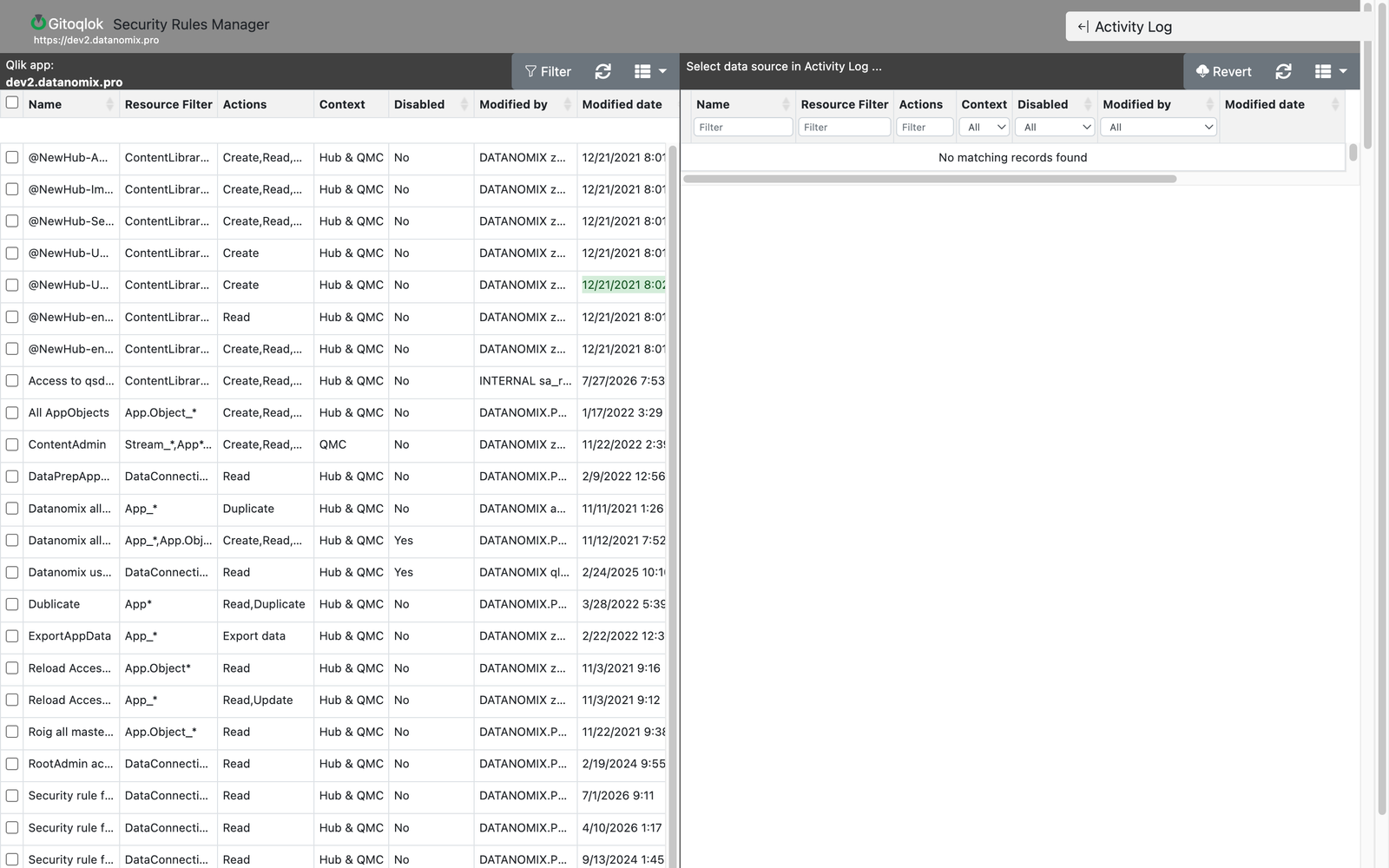
Layout
- Left: the rules of the server (Qlik app: dev2.datanomix.pro in the screenshot) with name, resource filter, actions, context, disabled flag, modified by and modified date. Filter, refresh and column controls are in the header.
- Right — Activity Log: pick a repository (a data source) to see its commits. Selecting a commit lists the rules that were exported or changed in it; recently changed cells are highlighted.
The list refreshes at the interval set in Repository Settings (Security Rules Manager: update interval).
Versioning rules
Rules get into a repository through Environment Migration → Export → Security Rules. Export regularly (or before every change) to build the history.
Reverting a rule
Select the repository and the commit in the Activity Log, find the rule and click Revert. The rule on the server is replaced by the version from that commit.
License
Security Rules Manager requires Gitoqlok Platinum. A 30-day trial is free — request one.